

Internal dispute resolution data dashboard
Welcome to the dashboard
The ASIC Internal Dispute Resolution (IDR) Dashboard is an interactive tool that shows IDR complaint data submitted by financial firms. It helps users explore trends and compare the complaint handling performance of financial firms.
To launch the dashboard, use the link below. You can also navigate through the dashboard pages using the navigation menu or by using the links at the bottom of the page.
Start dashboard: Key insights.
The importance of IDR
As the first step in the financial dispute resolution framework, IDR plays a vital role in providing remedies and protections for consumers. It is an avenue for redress to millions of Australians who complain to financial firms each year. ASIC is responsible for overseeing the effective operation of the dispute resolution system, which includes setting the standards and requirements for financial firms’ IDR processes.
Publishing IDR data supports improved trust and confidence in the financial system by:
- enhancing the accountability and transparency of financial services complaints handling, providing firms with an incentive for improved behaviour, and
- allowing firms to benchmark performance against other firms and to target their efforts to improve complaint handling and consumer outcomes.
This IDR data publication aligns with the publication of external dispute resolution (EDR) data by the Australian Financial Complaints Authority (AFCA) to provide a complete picture of the financial dispute resolution framework.
How to use the dashboard
How to search the dashboard
The IDR dashboard enables users to search for financial firms who have submitted a successful IDR data file containing their complaints during a reporting period.
You can search for a firm by:
- financial firm name
- licence number (Australian financial services licence or credit licence)
- Australian Company Number (ACN)
- Australian Business Number (ABN), or
- brand name.
You can filter the dashboard by:
- reporting period, showing half yearly data
- products
- issues, and
- outcomes.
Page filters
You can apply filters using the drop-down options at the top of each page. Users can select multiple products, issues and outcomes, or individual products to see more specific complaint counts.
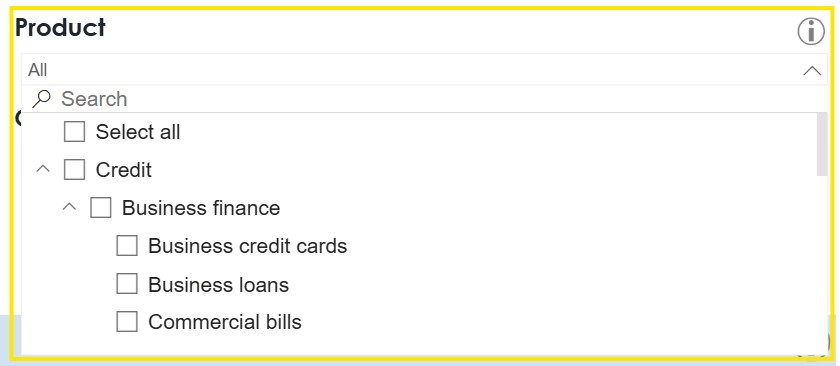
The Filters applied section will outline which filters have been selected.
Click ‘Clear filters’ to reset all filters on the dashboard.

Information icons
Hover over information icons to view details about how to interpret the data or use the charts/tables.
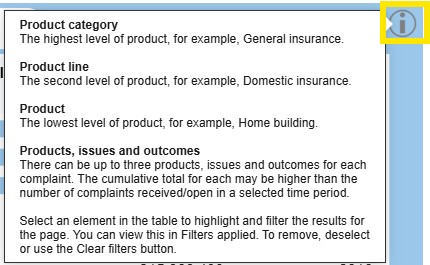
Tooltips
Hover over the data points or bars in a chart to view information about them.
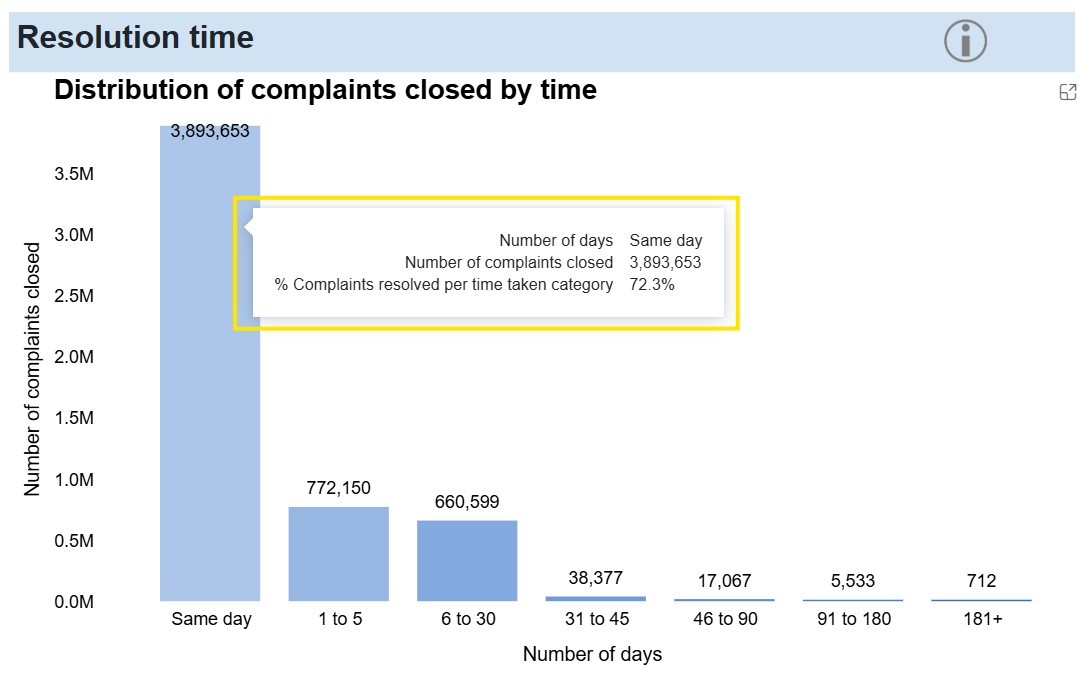
Explore charts
Change between yearly, half yearly and quarterly data in charts by hovering over the chart and using the arrows at the top right. Drill up and down refer to the ability to explore the next level of detail in a chart.
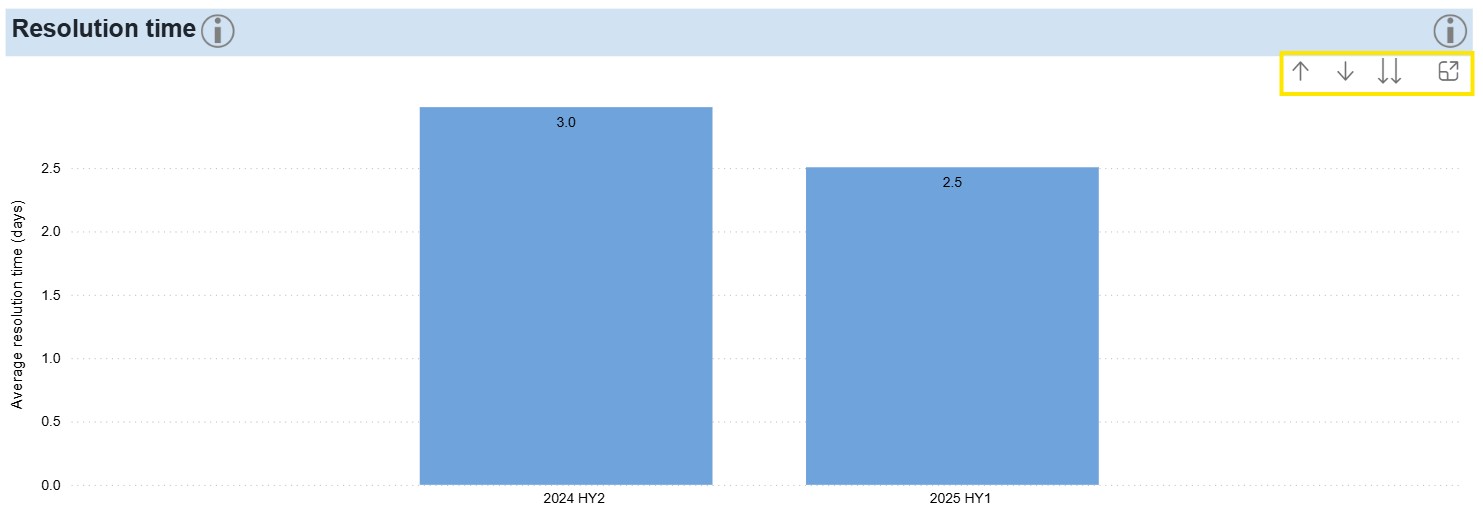
Single arrow down (Drill down mode): Select this button and a data point (for example, single bar in a bar chart) to drill down and show only the details for that data element.
Single arrow up (Drill up): This returns the chart to the previous higher level of the hierarchy.
Double arrow down (Go to next level): This shows the next level of the hierarchy for the whole chart, for example, moving from half yearly to quarters for all.
Focus mode: hover over a chart and click on focus mode in the top right to see the graph in more detail. You can still interact with the visual while in focus mode and can select 'Back to report' to return to the dashboard.
Show as a table
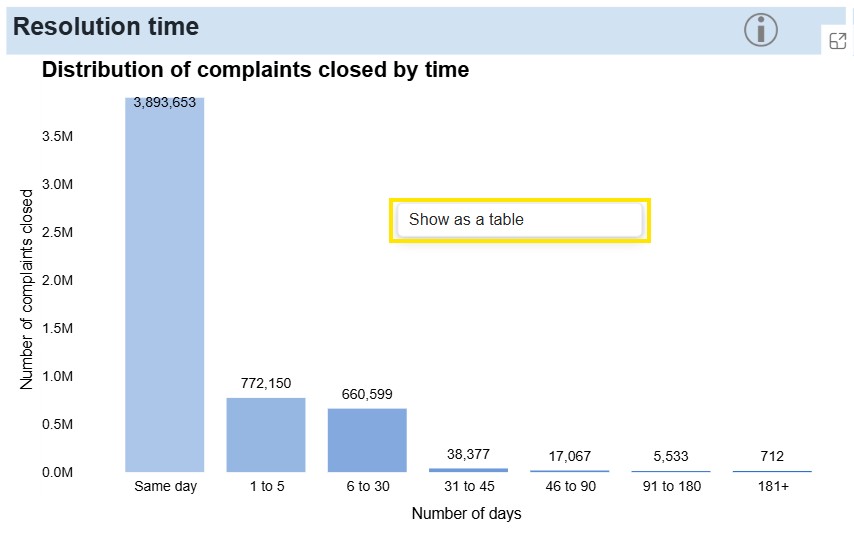
Right click on a chart and select ‘Show as a table’ to display the data behind the selected chart/visual. You can select 'Back to report' to return to the dashboard.
Products, issues and outcomes
Users can view IDR data by filtering for product, issue and outcome.
Products: Product category is the highest level and overarching topic, for example, General insurance. Product line is the second level, for example, Domestic insurance. Product is the lowest level and relates to the specific financial product the firm provides, for example, Home building.
Issues: Issue category is the highest level, for example, Advice. Issue is the lowest level, for example, Failure to provide advice.
Outcomes: The outcome of the complaint at the time it was closed at IDR, for example, Monetary remedy or a Service-based remedy.
Please refer to the IDR data reporting handbook for further information.
About the dashboard
Dashboard scope and methodology
The IDR dashboard supports ASIC’s commitment to improving transparency and accountability in financial services.
IDR data is self-reported, meaning the data ASIC receives may vary depending on the financial firms’ complaints recording practices. Our data collection process does not verify whether a firm’s IDR report accurately reflects their underlying complaints handling. Firms have an obligation to provide complete, accurate and timely IDR data.
What does it contain?
The dashboard presents firm-level complaint data submitted to ASIC every six months, as defined in the IDR data reporting handbook. This includes details of complaints received or open during each reporting period, including products, issues, and outcomes.
Licences held by individuals (rather than companies) are excluded from the IDR dashboard.
What can users expect?
- A clear view of the data firms must report to ASIC about their IDR processes.
- The ability to make comparisons between firms, products, issues and outcomes.
- Data updated biannually after each IDR data submission window.
What time period does the dashboard cover?
This dashboard includes IDR data for complaints received or open between 1 July 2023 and the most recent reporting period. Most firms must submit an IDR report to ASIC every six months. The reporting periods are:
- 1 January to 30 June, and
- 1 July to 31 December.
A two-month submission window opens at the end of each reporting period. Submission windows are:
- 1 January to end of February, and
- 1 July to 31 August.
We will update data biannually following each IDR data submission window.
Enquiries
What do I do if I encounter issues with the dashboard?
To contact ASIC regarding any issues or concerns with the dashboard please use ASIC's online enquiry form. To ensure your enquiry is directed to the appropriate team, please select that your question is about a ‘Credit Licence’ or ‘Financial Services Licence’ then select ‘IDR Data Dashboard’ and describe your concern.
How to interpret the data
Interpreting complaint totals
A high complaint count does not necessarily indicate poor performance. It can reflect a firm’s size, product offerings, or complaint recording and reporting practices.
Comparing two firms: Firm A and Firm B
Firm A receives a high number of complaints, but this is expected given its market share and product diversity. The firm has invested in robust complaints management systems, regular staff training, and a culture that encourages customers to provide feedback and raise concerns. Complaints are recorded promptly and customers are kept informed throughout the process.
Firm B receives less complaints, but this does not necessarily mean it is performing better. Complaints often take longer to resolve, with many exceeding the Regulatory Guide 271 Internal dispute resolution (RG 271) maximum timeframes.
In setting the standards and requirements for a firm’s IDR processes, ASIC encourages all firms to promote an organisational culture that welcomes feedback and values complaints.
A firm with a positive complaints management culture and robust IDR processes may record and report a higher number of complaints than a comparable firm.
Key measures of complaint handling performance
Time taken is the number of days taken to resolve the dispute and is the difference between the date received and date closed, calculated by ASIC or provided by the firm. If any measure of time is shown as ‘0.0 days’, this means the complaint was closed on the same day as it was received.
Average resolution time is the total number of days taken to close all complaints divided by the number of closed complaints. Note that, while this calculation provides an overall measure of resolution time, it is sensitive to outliers, such as complaints that take a long time to resolve.
Typical resolution time is less affected by outliers than the average and often more representative of typical complaint resolution times. Calculated by identifying the resolution time range where the 50th percentile falls and estimating the midpoint within that range.
Closed within a number of days is the percentage of complaints closed within a selected number of days. It is useful to see the percentage closed within a day, 7 days and other selections, for different products, issues and outcomes.
When comparing key measures of complaints handling performance it’s important to consider:
- complaints can vary in complexity and number of products and issues
- resolution times are influenced by the specific circumstances of the complaint, and
- maximum IDR times may vary depending on the product or issue (see RG 271 ).
Complaints with multiple products, issues, or outcomes
One complaint can contain up to three products, three issues and three outcomes. There is no implied link or hierarchy within the data elements used to record products, issues and outcomes. Rather, all products, issues and outcomes recorded are taken to relate to the complaint as a whole.
For example, a firm reports a complaint that is about two products, a credit card and a personal transaction account, and the complaint outcome is a monetary remedy. The monetary remedy outcome is taken to relate to both products, not one or the other.
Where complaint volumes are reported in tables or visualisations, the data is deduplicated so each complaint is counted once, even if it involves multiple products, issues or outcomes. However, table or visualisation totals may not match the sum of all the values in table or visualisation.
Complaint channels
IDR complaint channels are the methods through which customers can lodge complaints with a financial firm, such as phone, email, online, face to face, or social media.
A firm’s mix of channels reflects both the way its customers choose to communicate and the options it offers to its customers.
To aid accessibility, it is good practice for a firm to offer multiple channels for customer communication.
Zero complaints
Financial firms with no complaints in a reporting period must still submit an IDR report to ASIC. These firms do not submit complaints data but instead submit a report declaring that they have no complaints to report for the period. These IDR reports are called ‘nil submissions’.
The dashboard will show no complaints data for any firm that has successfully completed an IDR report in a current or previous reporting period but has not reported any complaints data in the selected date range. This can be either if the firm declared it had no complaints for the period, or if it did not submit an IDR report.
Disclaimers
Not advice
The data presented in this dashboard is as submitted by financial firms and ASIC does not represent or warrant that the data is accurate, fit for purpose or complete. Consumers should seek professional advice before making any financial decisions. To the maximum extent permitted by law, ASIC has no liability of any nature to any user of the data in respect of any loss or damage that may be suffered, directly or indirectly, in connection with the user’s reliance on or use of the data.
Data accuracy
IDR data is self-reported, meaning the data ASIC receives may vary depending on the financial firms’ complaints recording practices. Our data collection process does not verify whether a firm’s IDR report accurately reflects their underlying complaints handling.
To meet the key objective of improving transparency in the IDR system, ASIC has chosen to publish the IDR data as reported to ASIC.
ASIC has published detailed requirements and practical guidance in the IDR data reporting handbook to assist firms to report IDR data.
Data validation
At the time of collection, ASIC automatically validates financial firm’s IDR reports against the requirements of the IDR data reporting handbook.
These validation checks also require that each IDR complaint record in a firm’s submission is complete and unique.
Data updates
Firms have an obligation to provide complete, accurate, and timely data. Firms can amend or update IDR data for a previous reporting period in an open submission window, which means the data in this publication can change.
For example, a financial firm must report a complaint again if it is reopened and this will overwrite the data the firm previously reported. Firms may also add to or update their previously reported IDR data if they identify errors or omissions in past submissions.
About the data
Internal dispute resolution (IDR) plays a vital role in providing remedies and protections for consumers. It is an avenue for redress of millions of Australians who complain to financial firms each year. ASIC is responsible for overseeing the effective operation of the dispute resolution system, which includes setting the standards and requirements for financial firms’ IDR processes.
Not advice
When considering the presentation of the data, you should not rely on this as the sole basis for any financial decision-making. Consumers should seek advice before making any financial decisions. To the extent permitted by law, ASIC accepts no liability for any losses arising out of improper use, or release of the information.
Data accuracy
IDR data is self-reported by financial firms, meaning the data may vary depending on the complaints recording practices of the firms reporting the data. Through the IDR data collection process, ASIC does not verify that the data reported by firms accurately reflects their underlying complaints handling.
To aid in transparency, the IDR data has been published as it was reported to ASIC, with information provided on the complaint totals, products, issues, outcomes and resolution times for all complaints received. There is also information provided on firms who have failed to submit and IDR report and who declared that they had no complaints to report within a reporting period.
The obligation to report IDR data is ongoing every six months. Financial firms do have the ability to amend or update IDR data for a previous reporting period in an open submission window. This could change the data observations and statistics presented in this publication. For example, financial firms may change their internal IDR processes to more accurately record complaints and may amend previous complaints that were in the other serviced-related issues to a more descriptive category within the service issue table of the IDR handbook.
ASIC has published detailed requirements and practical guidance in the IDR data reporting handbook to assist firms to report IDR data. ASIC expects that firms will report data that accurately reflects the IDR processes and outcomes in their business.
How to interpret the data
One complaint can have up to three products, issues and outcomes. There is no implied link or hierarchy within the data elements used to record products, issues and outcomes. Rather, all products, issues and outcomes recorded are taken to relate to the complaint as a whole.
Therefore, the data may not add up to the total complaints received.
It is important to note that a high complaint count, on its own, is not an indicator of a poor performing or problematic product. Complaint counts between products will vary due to a range of factors, including the size of a product in the market.
Updating data
Financial firms lodge IDR data across two submissions windows from January to February and July to August each year.
Privacy policies
- IDR framework requires financial firms to report their IDR activities in accordance with ASIC requirements – see s912A(2A) of the Corporations Act 2001.
- ASIC cannot specify any information that is personal information within the meaning of the Privacy Act 1998.
- ASIC may publish IDR data (including information that may relate to a particular entity or may be information from which a particular entity may be identified) that is received under the new reporting requirements – see s243C of the ASIC Act 2001. It must not be personal information (see above).
Frequently Asked Questions
Definition of a complaint
A complaint is an expression of dissatisfaction made to or about a firm, related to its products, services, staff or the handling of a complaint, where a response or resolution is explicitly or implicitly expected or legally required.
For more information, see Regulatory Guide 271 Internal dispute resolution (RG 271).
Understanding IDR performance
I searched for a firm, and it has a high number of complaints, does that mean they are ‘bad’?
A high number of IDR complaints does not necessarily indicate poor performance by a firm. Complaint counts between firms will vary due to a range of factors, including the firm’s market share and product offerings.
A firm with a positive complaints management culture and robust IDR processes may record and report a higher number of complaints than a comparable firm.
A higher complaint count may be the result of:
- proactive staff training in identifying, correctly recording and reporting complaints
- a higher number of customers being aware of the process to raise a complaint
- more customers being dissatisfied with the product they are receiving, and
- a larger business size or market share of a particular product.
How do I determine whether a firm is handling complaints well?
Consider the type and complexity of the product or issue giving rise to the complaint. For example, a complaint about a $5 fee on a transaction account is simpler and quicker to resolve than a complaint about responsible lending obligations for a home loan.
Also consider:
- data alone does not explain the quality of outcomes or responses given
- a monetary remedy is not necessarily the most appropriate or fairest outcomes in all circumstances
- a service-based outcome may take longer to implement than an apology or explanation, and
- the appropriate outcome will depend on the specific circumstance of each complaint.
Searching firms
I searched for a firm in the ‘Enter financial firm’ bar and it is showing as ‘Firm not found'. What does this mean?
The search result will show ‘Firm not found’ if a firm has never submitted an IDR report to ASIC.
Australian financial services licensees that provide financial services to retail clients and all Australian credit licensees must submit IDR reports to ASIC. Licences held by individuals (rather than companies) are excluded from the IDR dashboard.
Use the ASIC Professional registers search to confirm a firm’s licence status.
I searched for a firm, and the dashboard shows no complaints data. What does this mean?
The dashboard will show no complaints data for any firm that has successfully completed an IDR report in a current or previous reporting period but has not reported any complaints data in the selected date range. This can be either if the firm declared it had no complaints for the period, or if it did not submit an IDR report.
Financial firms with no complaints in a reporting period must still submit an IDR report to ASIC. These firms do not submit complaints data but instead submit a report declaring that they have no complaints to report for the period (a ‘nil submission’).
How can I search certain date ranges?
For most firms, ASIC collects IDR data every six months. To compare data across a 12-month period, select two consecutive 6-month reporting periods from the date range dropdown.
The default view is the most recent 12 months.
Complaint channels
What are complaint channels?
IDR complaint channels are the methods through which customers can lodge complaints with a financial firm, such as phone, email, online, face to face, or social media.
A firm’s mix of channels reflects both the way its customers choose to communicate and the options it offers to its customers.
To aid accessibility, it is good practice for a firm to offer multiple channels for customer communication.
What does ‘Referral from AFCA’ mean?
The complaint was first lodged with the Australian Financial Complaints Authority (AFCA), which referred it back to the firm to complete its IDR process.
Using the dashboard
How often is data in the dashboard updated?
Complaints data is published biannually, following each submission window.
Where can I find External Dispute Resolution (EDR) data?
Firms are required to report their Internal Dispute Resolution (IDR) data to ASIC.
The Australian Financial Complaints Authority (AFCA) publishes EDR data in the AFCA Datacube on its website https://www.afca.org.au.
Data Dictionary
See the IDR data reporting handbook for comprehensive information about IDR data reporting.
In this dashboard, we have simplified Other service-related issues to Service-related issues and No remedy provided/apology or explanation only to Apology or explanation only, or no remedy.
Downloadable file
About the downloadable file
The IDR data downloadable file contains key complaint metrics pre-aggregated at firm-level in an excel file format. This dataset brings together key selected data including:
- Firm information such as name, ABN/ACN and licence details
- Complaint volumes for products, issues, and outcomes as well as the relationship between products and issues, products and outcomes, and issue and outcome
- Complaint handling metrics, such as the percentage of complaints resolved within specific timeframes, for example, resolved within a day and 7 days, as well as median time taken, and
- Monetary remedy such as average and median monetary remedy.
The downloadable file excludes:
- individual complaint-level (unit-level) data
- complainant demographic information
- nil submissions
- free-text fields
- if the complaint relates to an authorised representative, and
- data from licensees that are held by individuals.
Understanding the downloadable file
The downloadable file contains pre-aggregated complaint data. This means the data has already been grouped into summary tables, such as firm-level totals, product totals, issue totals, outcome totals, and product–issue, product–outcome and issue–outcome combinations. Each row is not an individual complaint.
Warning about adding complaint counts. This file contains pre-aggregated data, not individual complaint records. A single complaint can be recorded against up to three products, three issues and three outcomes, so it may appear in more than one row in the product, issue, outcome, and combination tabs. For example, a complaint about both a delay in complaint handling and fee/costs may appear under both issue categories. Adding those issue rows together would count the same complaint twice.
Use the firm-level metrics tab for total complaint counts by firm and reporting period. Use the other tabs to analyse patterns and complaint handling performance across firms. Do not add complaint counts across different tabs, or across rows in product, issue, outcome, or combination tabs, to calculate a total number of complaints, as this may lead to double counting.
Disclaimers
Not advice
The data presented in this workbook is as submitted by financial firms and ASIC does not represent or warrant that the data is accurate, fit for purpose or complete. Consumers should seek professional advice before making any financial decisions. To the maximum extent permitted by law, ASIC has no liability of any nature to any user of the data in respect of any loss or damage that may be suffered, directly or indirectly, in connection with the user’s reliance on or use of the data.
Data accuracy
IDR data is self-reported, meaning the data ASIC receives may vary depending on the financial firms’ complaints recording practices. Our data collection process does not verify whether a firm’s IDR report accurately reflects their underlying complaints handling. To meet the key objective of improving transparency in the IDR system, ASIC has chosen to publish the IDR data as reported to ASIC.
ASIC has published detailed requirements and practical guidance in the IDR data reporting handbook to assist firms to report IDR data.
ASIC does not endorse or take responsibility for any interpretations, calculations, summaries, or conclusions drawn from the data by third parties.
Data validation
At the time of collection, ASIC automatically validates financial firm’s IDR reports against the requirements of the IDR data reporting handbook. These validation checks also require that each IDR complaint record in a firm’s submission is complete and unique.
Data updates
Firms have an obligation to provide complete, accurate, and timely data. Firms can amend or update IDR data for a previous reporting period in an open submission window.
For example, a financial firm must report a complaint again if it is reopened and this will overwrite the data the firm previously reported. Firms may also add to or update their previously reported IDR data if they identify errors or omissions in past submissions.
The data in this workbook reflects information available at the time of the release date of the file and may change in subsequently released files if firms update or amend their complaint data.
Released: 3 June 2026
Data to: 31 December 2025
Note: Please open the file using the Excel Desktop application, as Excel Online may not support it due to its size.
Key insights
Search for a financial firm to see a summary of its complaints data. Refine your results by selecting specific products, issues, outcomes, or reporting periods. The default view shows data for all firms and the default timeframe shown is the most recent 12 months.
A high complaint count does not necessarily indicate poor performance. It can reflect a firm's size, product offerings, or complaint recording and reporting practices.
Compare financial firms
Search up to three (3) financial firms to compare their complaints data. Refine your results by selecting specific products, issues, outcomes, or reporting periods. The default view shows data for all firms and the default timeframe shown is the most recent 12 months. Remove a firm by clicking (x) to add another.
Complaints overview
Search for a financial firm to see a more detailed overview of its complaints data. Refine your results by selecting specific products, issues, outcomes, or reporting periods. The default view shows data for all firms and the default timeframe shown is the most recent 12 months.
A high complaint count does not necessarily indicate poor performance. It can reflect a firm's size, product offerings, or complaint recording and reporting practices.
Resolution time trends
Search for a financial firm to see trends in its complaint resolution times. Refine your results by selecting specific products, issues, outcomes, or reporting periods. The default view shows data for all firms and the default timeframe shown is the most recent 12 months.
Volume trends
Search for a financial firm to see its complaint volume trends over time. Refine your results by selecting specific products, issues, outcomes, or reporting periods. The default view shows data for all firms and the default timeframe shown is the most recent 12 months.
A high complaint count does not necessarily indicate poor performance. It can reflect a firm's size, product offerings, or complaint recording and reporting practices.
Monetary remedy
Search for a financial firm to see more detail about its complaints resolved by monetary remedy. Refine your results by selecting specific products, issues, or reporting periods. The default view shows data for all firms and the default timeframe shown is the most recent 12 months.
There can be up to three products and issues for a complaint. A monetary remedy outcome is taken to relate to all products and issues, not one or the other.
Complaints by channel
This page shows data on how complaints were received. Refine your results by selecting specific products, issues, outcomes, or reporting periods. The default view shows data for all firms and the default timeframe shown is the most recent 12 months.
A high complaint count does not necessarily indicate poor performance. It can reflect a firm's size, product offerings, or complaint recording and reporting practices.
Complainant demographics
This page shows complainant demographic data. This page does not show firm-level data.
Refine your results by selecting reporting period, complainant type, product, issues, outcomes, or resolution time. The default view shows data for all firms and the default timeframe shown is the most recent 12 months.