

Lodge unclaimed money returns: Life insurance companies and benefit fund friendly societies
An unclaimed money return is where an entity provides to ASIC unclaimed money in accordance with the law.
All life insurance companies and benefit fund friendly societies (life company/friendly society) must submit an annual unclaimed money return to ASIC by 31 March each year containing the unclaimed money as at 31 December of the previous year (section 216 of the Life Insurance Act 1995 (Life Insurance Act)).
Find your lost money
Use Moneysmart's Unclaimed money search
What is unclaimed money for life companies/friendly societies?
Section 216 of the Life Insurance Act identifies unclaimed money as all sums of money that have become legally payable by a life company/friendly society in respect of policies, but where the time limit for commencing proceedings for recovery of these funds has expired. This includes money payable on the maturity of a policy which has not been claimed in seven years after the maturity date and any money that the life company/friendly society considers should be treated as unclaimed money.
However, this does not include unclaimed money held in retirement savings accounts (within the meaning of the Retirement Savings Accounts Act 1997).
How a life company/friendly society lodges a return
Each year by 31 March life companies/friendly societies must lodge a return with ASIC providing the unclaimed money held by them as at 31 December of the previous year.
As a life company/friendly society, you can lodge your return by:
- completing a CSV return form
- lodging a csv return form (through MOVEit), and
- making payment to ASIC of the unclaimed money.
Completing a CSV return form
A CSV return form is an Excel spreadsheet and contains:
- Header record: Where the life company’s/friendly society’s information is entered (row 1)
- Detail record/s: Where the unclaimed money record is entered (rows 2, 3, etc).
To make an Excel spreadsheet into a CSV return form you will need to save it as a comma delimited file format (.csv). To do this, use ‘save as’ to change the spreadsheet type to .csv.
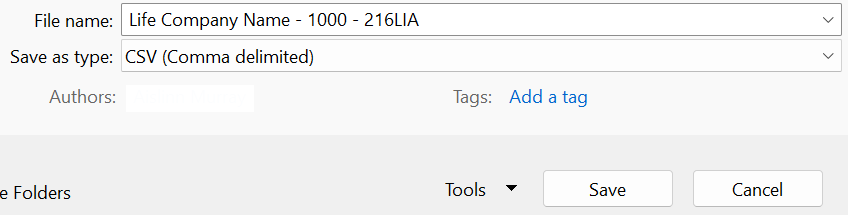
The CSV return form has a specific format that must be complied with for ASIC’s system to receive and process the return. Our downloadable guide to the CSV return form includes the information to be included and the required format.
The CSV return form has a specific format that must be complied with for ASIC’s system to receive and process the return. Our downloadable guide to the CSV return form includes the information to be included and the required format.
Download the Guide to the Life Insurance Act CSV returns form (PDF)
It is advisable to check that your CSV return form has:
- a Header record
- correct totals in the Header record
- the full name and last known address of the owner of the policy and of the life insured by the policy (‘unknown’ addresses may be rejected)
- the amount due for each Detail record
- the policy number
- the date the policy became due (should be more than seven years ago for unclaimed policy money)
- the state where the policy was registered.
The detailed information you provide ensures that accurate and sufficiently complete unclaimed money details can be made available to the public and claimants identified. This information can be searched on our consumer website Moneysmart.
Tips for avoiding lodgement rejection
ASIC performs automated data quality checks on all bulk upload files. Many of the following issues are introduced when data is copied between systems or edited in spreadsheets. Reviewing your file before upload can help identify and correct common formatting issues and reduce the likelihood of rejection.
Useful tips about MOVEit:
- Convert your file to CSV before loading through MOVEit.
- Use the required file naming convention for your CSV file and Statement of Compliance (as outlined in the MOVEit user guide).
- Upload files to the correct MOVEit folder (use Lodgements for lodgement submissions or Claims for claim submissions).
Your file may be rejected if it contains:
- Extra spaces before or after values
- Hidden characters (such as tabs or non-breaking spaces)
- Dollar signs ($) in numeric fields
- Amounts with more than 2 decimal places
- Duplicate records
- Invalid postcodes or country codes
- Missing required information
- Commas, quotation marks, or special characters where they are not expected.
Lodging the CSV return form (through MOVEit)
Once you have completed your CSV return form you can lodge it through the MOVEit platform. If this is your first time lodging through the platform, contact unclaimed.money@asic.gov.au to set-up a lodgement account. Lodging your CSV return form via the platform supports secure and effective transmission of your return to ASIC.
Your lodgement must also include a signed Statement of Compliance confirming that the funds meet the requirements of the legislative section under which the lodgement is being made.
Download a copy of the Statement of Compliance – S216 Life Insurance Act.
Making payment to ASIC of unclaimed money
You will receive email confirmation that your CSV return form has been accepted and details of how you can make payment will be provided.
If the payment of the unclaimed money is not received by ASIC within 5 business days of ASIC’s email your return may be rejected.
Lodging a nil return
If you have no unclaimed money as at 31 December of the previous year, as a life company/friendly society you must still lodge a return by 31 March.
Lodging a nil return (via email)
You can lodge a nil return by using this email.
Word your email as follows:
To: unclaimed.lodging@asic.gov.au
Subject: Life company/Friendly society unclaimed money nil return for <insert your company>
<Your life company/friendly society name>
<Year of Return>
I refer to our annual unclaimed money return. This is to confirm that we have no money to be provided to ASIC as unclaimed money.
<Name of person submitting the email>
<Position of person>
<Contact phone number>
Contact us
Contact the Unclaimed Money Unit:
by phone: 1300 300 630
by email: unclaimed.lodging@asic.gov.au
Postal address:
Unclaimed Money Unit
Australian Securities & Investments Commission
PO Box 4000
Gippsland Mail Centre VIC 3841